
Your profile
/profile shows your profile as an image card. It works in the game topic and in a
private chat with Nani Pix (in private, for group members only). Add a username to look at someone else’s card:
/profile @username, or tap 🔍 Someone else under your own card to pick a player from a menu.
@alice 🌸 · Demo Star Seasons played: 2 Cosmetics owned: 5
The card shows:
- your avatar, your name and the title you chose;
- up to four of your achievements, each in its rarity colour (the ones you picked, or your rarest);
- up to six season stamps, one per finished season you earned Season XP in, with the season’s full name under it (the ones you picked, or your newest seasons). A stamp has the season’s art, a gold ring once you finished the season’s free pass, and a golden version if you claimed the season’s Premium stamp reward;
- 🏅 how many seasons you have played and 🎁 how many cosmetics you own.
The caption under the card also shows your name flair, if you equipped one.
Here are Sakura Season’s three stamps on a card: the plain one, the one with the gold ring and the golden Sakura+.
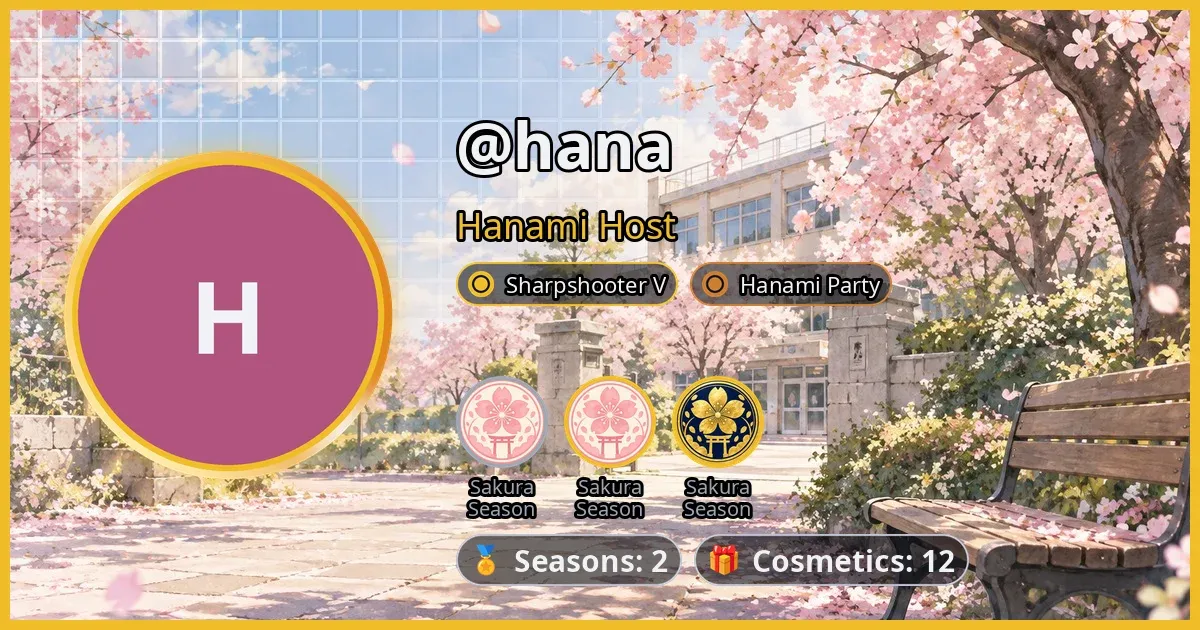
The card’s background is your equipped profile banner. Without one, it is the key visual of the last season you played, or a dark gradient if you haven’t played a season yet. A grid of faint glass pixels sits over the top-left corner and fades out toward the middle; it turns light or dark to suit the picture under it. The picture itself is never darkened, and every text and counter on the card has a thin dark outline, so it reads on any banner.
If the username isn’t known to Nani Pix, she answers that she doesn’t know that player.
Browsing other players
Section titled “Browsing other players”The card comes with buttons that work right in the same message:
- ◀ Prev and Next ▶ switch to the previous or next player, wrapping around at the ends;
- 👥 Players turns the message into a list of players, eight per page; tap a name to open that card, or ↩ My card to go back to yours.
Both walk the players who actually play: everyone who has hosted, won or guessed in a
finished game, the most games first (then by name). Nani Pix isn’t listed, and neither is
someone who has only ever lurked, though you can always open their card with
/profile @username. You are always in the list, at the end until your first game.
Only the person who sent /profile can use the buttons on that card. Anyone else gets a
short note to send /profile themselves.
Choosing what your card shows
Section titled “Choosing what your card shows”On your own card, in a private chat with Nani Pix, there is one more button: ✏️ Choose what my card shows. It opens two tabs, Season stamps and Achievements, listing everything you hold; ✅ marks what is on your card.
- Tap one to show or hide it. They appear on the card in the order you tick them.
- The card fits up to 6 stamps and 4 achievements. Once you’re at the limit, hide one before adding another.
- For an achievement with several tiers, only the highest one you hold is listed.
- With nothing picked, the card shows your newest seasons and your rarest achievements (rarest first, then the highest tier, then the most recent).
↩ Done brings the card back with your changes.