
Scheduling seasons
A season is a limited-time event with its own rules and standings. The first one was
Sakura Season (sakura_1); the Halloween one is
Yōkai Night (yokai_1), meant to run for about two
weeks around 31 October. This page is for scheduling them.
/season works in a DM with Nani Pix, for group admins only.
Your time zone
Section titled “Your time zone”Dates are typed in your own time zone, the one you set with /timezone (see
Automatic rounds and quiet hours). Without one, /season
asks you to set it first. Every reply shows the dates back in that zone.
Commands
Section titled “Commands”| Command | What it does |
|---|---|
/season |
Shows the current season, the seasons held before it and the ones you can still schedule |
/season schedule <run> <YYYY-MM-DD> <HH:MM> <YYYY-MM-DD> <HH:MM> |
Schedules a season: its id, then start, then end |
/season start <YYYY-MM-DD> <HH:MM> |
Moves the start of a season that hasn’t started yet |
/season end <YYYY-MM-DD> <HH:MM> |
Moves the end |
/season end now |
Ends a running season right away |
/season cancel |
Cancels a season that hasn’t started yet |
For example:
/season schedule yokai_1 2026-10-29 06:00 2026-11-13 06:00The status view also shows who scheduled each season.
- Only one season can be scheduled or running at a time.
- Each run can be held once. A run that has started is never offered again; one that was cancelled before starting can be scheduled again.
- The end has to come after the start, and in the future.
- The start can only be moved before the season begins, and so can cancelling.
- A run’s special day only happens if the season’s dates cover it. Yōkai Night’s
Night Parade is 31 October in
the group’s time zone: the one set for quiet hours,
or UTC when none is set, not your own
/timezone. Schedule the season over that whole day.
Giving a cosmetic
Section titled “Giving a cosmetic”/grantitem @username <item id> (DM, group admins) gives a player a season cosmetic, for
example /grantitem @bob sakura_1/name_flair.blossom. The item id is the run id, a slash,
then the item’s key. Leave out the @username (/grantitem <item id>) and she shows a menu of players to choose from. Nani Pix names the item she gave, or says the player already has it, or
that she doesn’t know the player or the item.
What the group sees
Section titled “What the group sees”Nani Pix posts a teaser to the group when a season is scheduled (and again if its dates move; date edits made before the teaser is posted share that one post), an announcement when it starts and another when it ends. A season that is ended while games are still running finishes once those games are done.
Right under the teaser and the start announcement comes the season guide: one message that walks players through everything the season brings, from what a round earns to every new mechanic (haunted rounds, the event day, the shared goal, hexes, omikuji, charms), with the season’s numbers in tables and a link to the matching page of this guide for each.
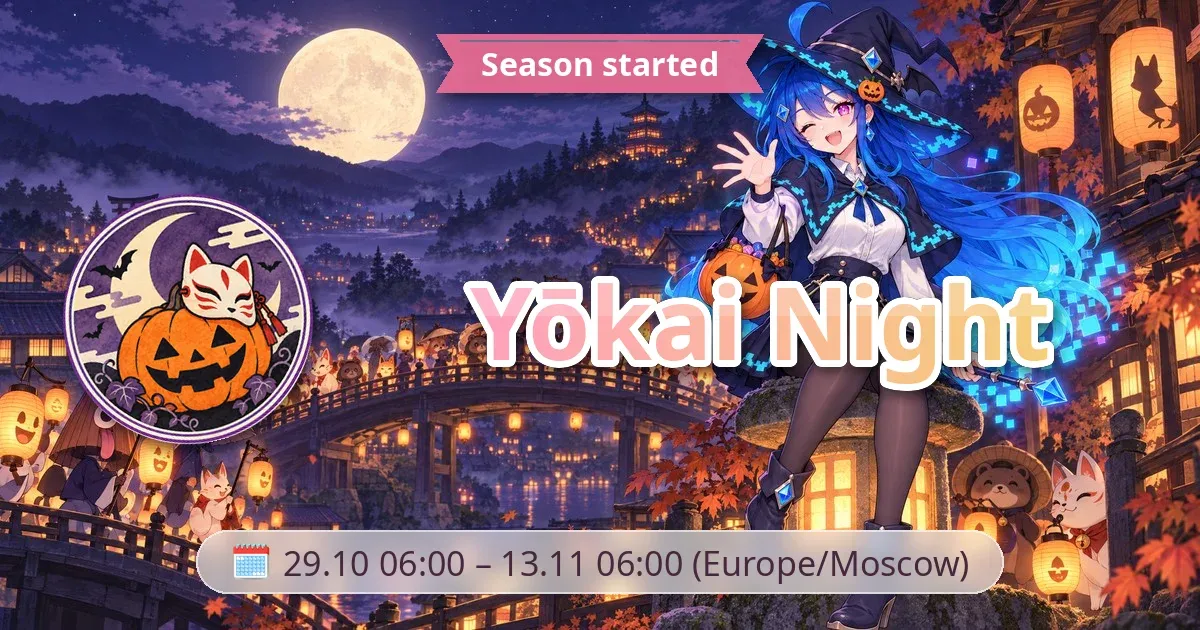
These posts are cards over the season’s key visual: a ribbon headline, the season’s stamp, the name in a gradient and a 🗓 pill with the dates. This is Yōkai Night’s start post:
Season Coins at the end
Section titled “Season Coins at the end”When a season ends, every player’s leftover Season Coins 🪙 are turned into pixels 💠 at the run’s rate (normally 2 🪙 for 1 💠; a leftover odd coin is dropped) and every coin balance is emptied. The end post says how many players’ coins became how much 💠, and the rate. See Season Coins and the Season Pass.